
Joomla Extensions
DD Gallery Component for Joomla 5 & 6
Hits: 3272
DD Gallery Component for Joomla 5 & 6 is a free gallery and media extension for the Joomla CMS, designed to create, manage, and display image and multimedia galleries in a professional way. It is fully compatible with Joomla 5 and Joomla 6 and provides responsive layouts for modern websites. The component allows easy organization of images into albums, categories, and grid-based displays with seamless site integration.
UPDATED ON
18.02.2026
VERSION
1.3.3
JOOMLA
5.x, 6.x
PHP
8.4.x
Key Features
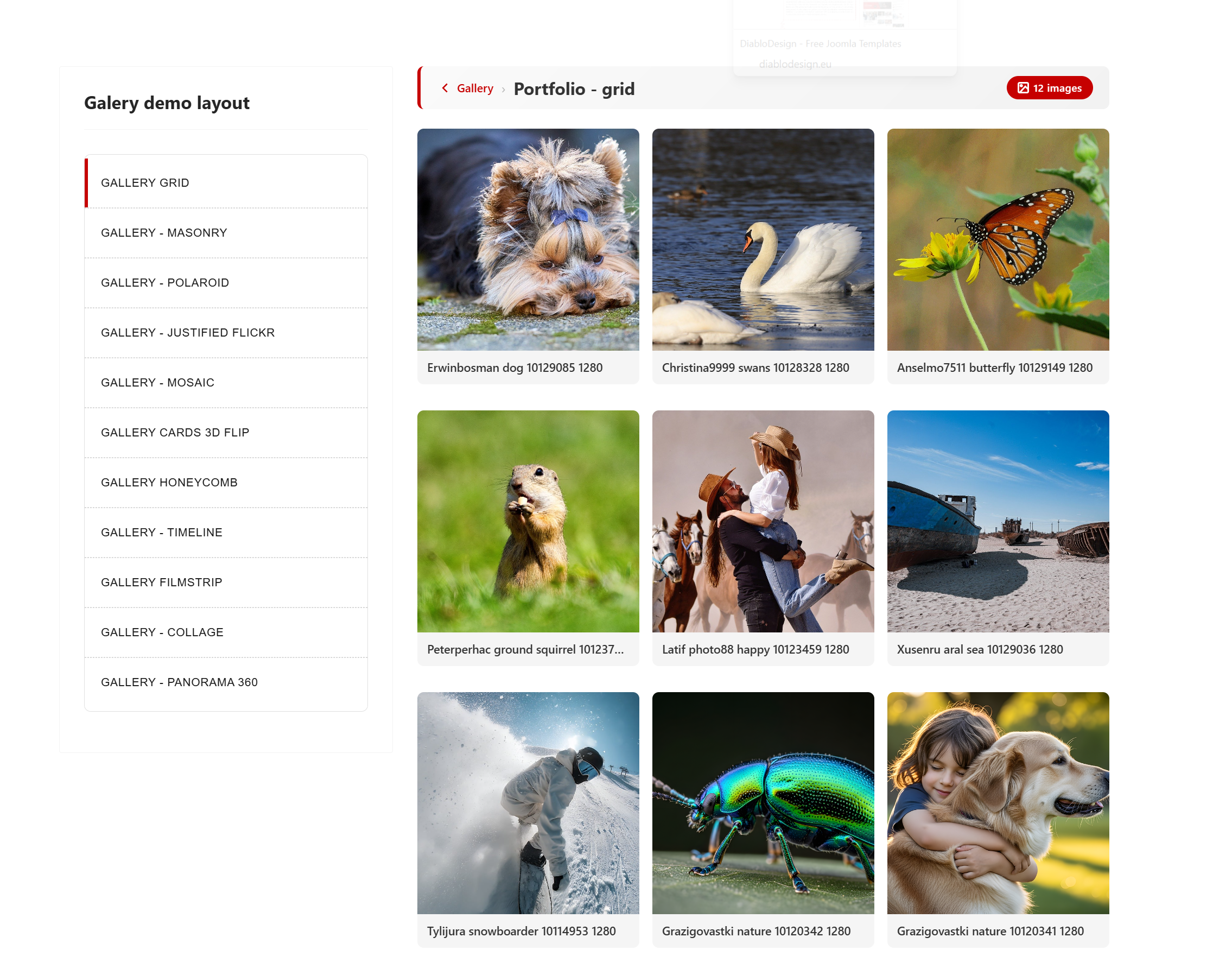
🎨 12 Professional Layouts
- Grid — Clean responsive grid with configurable columns (2–6)
- Masonry — Beautiful Pinterest-style layout with natural image proportions
- Slider — Full-width carousel with arrows, dots, thumbnails strip, and keyboard navigation
- Filmstrip — Retro 35mm film roll effect with sprocket holes, auto-scroll animation, and Play/Pause controls
- Honeycomb — Eye-catching hexagonal grid pattern
- Panorama 360° — Full WebGL-powered panoramic viewer with mouse/touch/gyroscope controls, compass, zoom, and auto-rotation
- Polaroid — Classic instant photo style with captions
- Justified — Edge-to-edge gallery with even row heights
- Mosaic — Dynamic tile arrangement for visual impact
- Cards — Material-style cards with title and description
- Timeline — Chronological layout perfect for event photography
- Collage — Artistic collage arrangement
📤 Smart Upload System
- Drag & Drop — Simply drag images into the upload zone
- ZIP Upload — Upload a full archive and let the system extract it automatically
- Custom Naming — Set naming patterns with auto-incrementing numbers (e.g.,
vacation-1, vacation-2, ...) - Configurable Limits — Set max upload size (up to 50 MB), allowed extensions (JPG, PNG, GIF, WebP)
- Automatic Thumbnails — Custom dimensions for thumbnails (100–600px) and medium images (up to 1920px)
- WebP Conversion — Optional automatic conversion to WebP format
- EXIF Extraction — Reads camera metadata from uploaded photos
🌐 360° Panorama Viewer
- Full WebGL rendering with custom shaders (equirectangular → sphere projection)
- Mouse drag, touch gestures with inertia, and device gyroscope support
- Zoom via scroll wheel or pinch (FOV 30°–120°)
- Keyboard controls (arrows, +/-, F for fullscreen, Space for auto-rotate)
- Configurable auto-rotation speed
- Built-in compass/orientation indicator
- Loading progress bar
- Thumbnail navigation between multiple panoramas
⚡ Performance & SEO
- Lazy Loading — IntersectionObserver + native
loading="lazy"for fast page loads - Schema.org — Full ImageGallery & ImageObject microdata for search engines
- Responsive Design — CSS Custom Properties, adapts to any screen size
- Touch & Swipe — Native gesture support on mobile devices
- JPEG Quality Control — Set compression level (50–100%)
- Pagination — Configurable items per page (4–200)
🔧 Admin Panel
- Tabbed album editor (Details / Images / Publishing)
- Inline image editing with drag-and-drop sorting
- Album cover image with colored border indicator
- Featured/Published status toggles
- Image count badges
- Full color customization (primary, secondary, background, overlay, text)
- Per-album layout and column selection
🎨 Built-in Lightbox
- Beautiful full-screen image viewer
- Keyboard & touch navigation
- Image titles and descriptions
- No extra plugins needed — it's all included
DDGallery Module for Joomla 6
Display images from your DDGallery albums anywhere on your site — in a grid, masonry, or slider layout.
Key Features
🖼️ 3 Display Layouts
- Grid — Responsive image grid with hover overlay and zoom icon. Configure 2–6 columns.
- Masonry — Pinterest-style layout preserving natural image proportions
- Slider — Full-width 16:9 carousel with prev/next arrows and dot navigation
⚡ Features
- Album Selector — Choose any album created in DDGallery component via a simple dropdown
- Built-in Lightbox — Click any image to view it full-size in an elegant lightbox (uses component's lightbox)
- Lazy Loading — Images below the fold load on demand for faster page speed
- "View All" Link — Optional link to the full album page for visitors who want to see more
- 5 Sorting Options — Default order, newest first, alphabetical, random, or most popular
🎨 Full Style Control
- Primary Color — Customize accent color for buttons and hover effects
- Overlay — Adjustable color and opacity (0–100%) for hover effect
- Border Radius — From sharp corners (0) to circles (50%), with 4px, 8px and 12px presets
- Gap Control — Choose spacing between images (0 / 4px / 8px / 16px / 24px)
- Image Count — Display 1 to 50 images per module instance
📋 Requirements
This module requires the DDGallery Component (com_ddgallery) to be installed. The module displays images from albums managed by the component.
Media & Content